_1762866128417-DS2_OO1j.png)
What "documented information" means
Since the 2015 revision, ISO 9001 no longer talks about documents and records but uniformly about documented information. This means any information an organisation needs to control and maintain – regardless of format and medium. It can be a Word document, an intranet page, a record in a software system, a photo or a video.
The standard distinguishes two forms, recognisable by the wording:
| Wording in the standard | Meaning | Formerly | Examples |
|---|---|---|---|
| Maintain documented information | Requirements that must be kept up to date | Document | Quality policy, scope, procedures, work instructions |
| Retain documented information | Evidence that must be protected from changes | Record | Audit reports, training records, inspection records, management review results |
Note that the standard explicitly requires documented information in only a few places. Beyond that, you decide which documents are necessary for the effectiveness of your QMS (7.5.1 b). An overview of the explicitly required documents is in the guide ISO 9001 mandatory documents.
The three parts of clause 7.5
- 7.5.1 General: the QMS must include the documented information required by the standard and the information you determine as necessary. The extent depends on size, activities, process complexity and the competence of people.
- 7.5.2 Creating and updating: documents need appropriate identification and description (such as title, date, author, number), a suitable format and medium, and review and approval for suitability and adequacy.
- 7.5.3 Control: documented information must be available and suitable for use where and when it is needed. It must be adequately protected – for example from loss of confidentiality, improper use or loss of integrity.
In 7.5.3.2 the standard lists the specific control activities: distribution, access, retrieval and use; storage and preservation, including legibility; control of changes, such as version control; and retention and disposition. Documents of external origin must also be identified and controlled.
Creating and identifying documents correctly
So that everyone can tell whether they have the right version, every controlled document needs consistent identification. These attributes have proven useful:
| Attribute | Purpose |
|---|---|
| Document number | Unique identification and referencing, e.g. SOP-08-03 |
| Title | Content recognisable at a glance |
| Document type | Distinguishes policy, procedure, work instruction, form |
| Version and effective date | Shows which version applies from when |
| Prepared, reviewed, approved | Evidence of review and approval per 7.5.2 c |
| Owner | Who keeps the document up to date? |
| Revision history | What changed compared with the previous version and why? |
As for format: keep it as simple as possible. A flowchart with a few sentences is often clearer than a multi-page description. The guide how to write an SOP shows how to phrase good requirements.
Distribution, access and protection
The best requirement is useless if it is not available at the workplace – or if the old version is still posted there. Define who may read, edit and approve which documents, and how new versions reach the people who use them.
- Single source of truth: there is exactly one place where the valid version lives. Copies on drives or in mailboxes are not controlled.
- Role-based access: everyone who needs a document may read it; only authors may edit; only authorised people may approve.
- Announcing new versions: affected people are informed, for important changes with a read acknowledgement or training.
- Controlling printouts: paper copies are marked, for example as a controlled copy that can be verified, or as an uncontrolled copy with a note on same-day validity.
- Protection: confidential documents are only accessible to authorised people, and evidence is protected from unintended changes.
Controlling changes
Every change to a requirement must be traceable: who changed what, when and why, and who approved the new version? Real version control meets this requirement automatically, because changes are only possible through a new, reviewed version. The previous version remains archived and is marked as superseded.
- 1
Identify the need for change
Triggers include audit findings, complaints, process changes, new requirements or suggestions from employees.
- 2
Create a new version
The change is made in a draft; the valid document stays in use until release.
- 3
Review and approve
Subject-matter owners review and approve the change – following the four-eyes principle.
- 4
Announce and train
Affected people are informed; significant changes are followed by training or a read acknowledgement.
- 5
Archive the old version
The previous version is withdrawn from use and retained as evidence.
Documents of external origin
Standards, laws, customer drawings, supplier specifications or manufacturer manuals don't come from you, but they are binding for your processes. The standard requires you to identify and control these documents. In practice: keep a list of relevant external documents with their revision level, define who reviews new editions, and ensure only current versions are used.
For laws and standards, an early warning system such as the regulatory radar helps you notice changes in time.
Retaining records
Evidence must be legible, retrievable and protected from unintended alteration. ISO 9001 does not set retention periods – they follow from legal requirements, customer requirements and your own assessment. Define the retention period for each type of record and what happens afterwards.
| Record | Typical consideration for the period |
|---|---|
| Inspection records and releases | Product life plus warranty and liability period |
| Training records | Duration of employment plus a reasonable period |
| Audit reports | At least one certification cycle |
| Complaints and corrective actions | At least until the effectiveness check, usually longer |
| Industry-specific evidence | As required by law, e.g. at least ten years for medical devices |
Paper, shared drive or software?
| Criterion | Paper and binders | Shared drive | Document management software |
|---|---|---|---|
| Valid version recognisable | Only with discipline | Often unclear due to copies | Clear through status and version |
| Approval demonstrable | Signature on cover sheet | Rarely | Approval workflow with log |
| Distribution | Manual, laborious | Folder structure | Notification, read acknowledgement |
| Revision history | Change sheet | File names | Automatic per version |
| Audit preparation | Collect binders | Search | Evidence at the push of a button |
For small companies with few documents, a well-organised drive can be enough. Once several sites, standards or dozens of requirements are involved, document management software saves considerable time and audit stress.
Common audit findings
- An outdated work instruction is at the workstation even though a new version has been approved.
- Documents are approved, but nobody can show who reviewed them and when.
- Forms are changed directly, without a new version and without approval.
- External documents such as standards or customer drawings are in outdated editions.
- Retention periods are not defined or not followed.
- Employees don't know about new requirements because they were never announced.
Use the document control checklist to check your system for exactly these weaknesses in 30 points.
Document control with docxpert
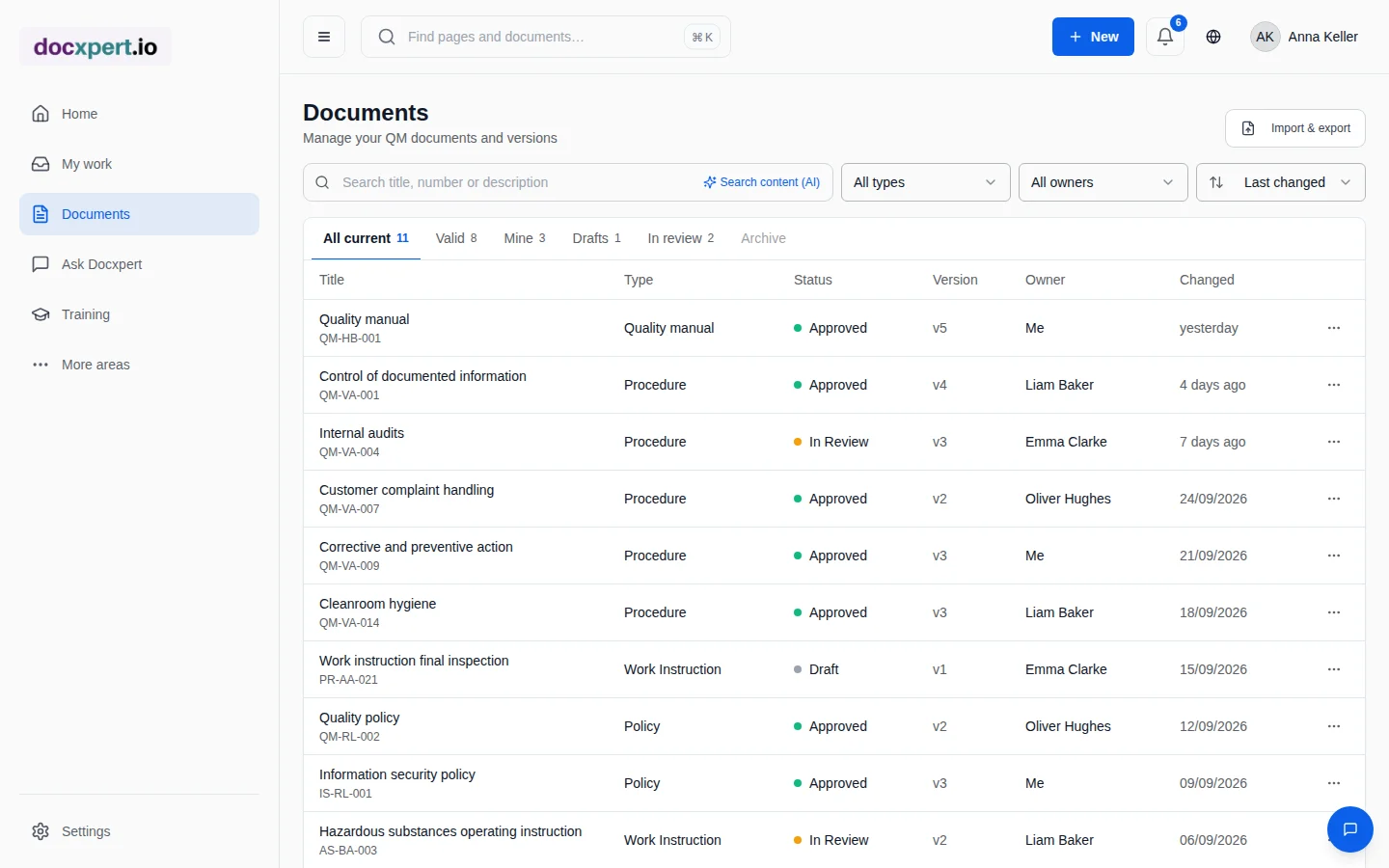
docxpert covers the requirements of 7.5 in one continuous flow: documents are created from templates or imported, go through a configurable approval workflow, are distributed with read acknowledgements and updated through new versions when they change. Every step is logged in the audit trail.
Frequently asked questions
What is the difference between maintaining and retaining?
Maintaining means keeping a requirement up to date – it is changed when needed. Retaining means preserving evidence unchanged. A procedure is maintained; an audit report is retained.
Do I need a document control procedure?
ISO 9001:2015 no longer explicitly requires one. But a short description of how documents are created, approved, distributed and changed is useful and often serves as evidence in audits.
Do documents have to be signed?
No. The standard requires review and approval, but not a handwritten signature. A logged electronic approval with person and time meets the requirement.
How should I handle printed documents?
Mark printouts either as a controlled copy whose validity can be checked, or as an uncontrolled copy with a note that only the electronic version is binding.
How often must documents be reviewed?
The standard sets no interval. A regular review every one to three years depending on importance has proven useful, plus event-driven reviews after process changes or audit findings.
Are emails part of documented information?
Only if they serve as evidence or contain requirements. In that case the content should be moved into the controlled system rather than staying in mailboxes.
How do I decide whether an email must be retained as a controlled record?
Ask whether the message contains an approval, binding decision, customer requirement or evidence of a process step. If it does, preserve the relevant information in the designated records system and link it to the affected order, case or document. Keep enough context, such as sender, date and attachments, for the record to make sense later. Not every conversation needs archiving: routine exchanges with no evidential value can follow your retention rule. Avoid making personal mailboxes the only location for important decisions. Define owners and retention periods, and apply privacy and deletion rules. This keeps records findable without collecting every message indefinitely.