_1762866128417-DS2_OO1j.png)
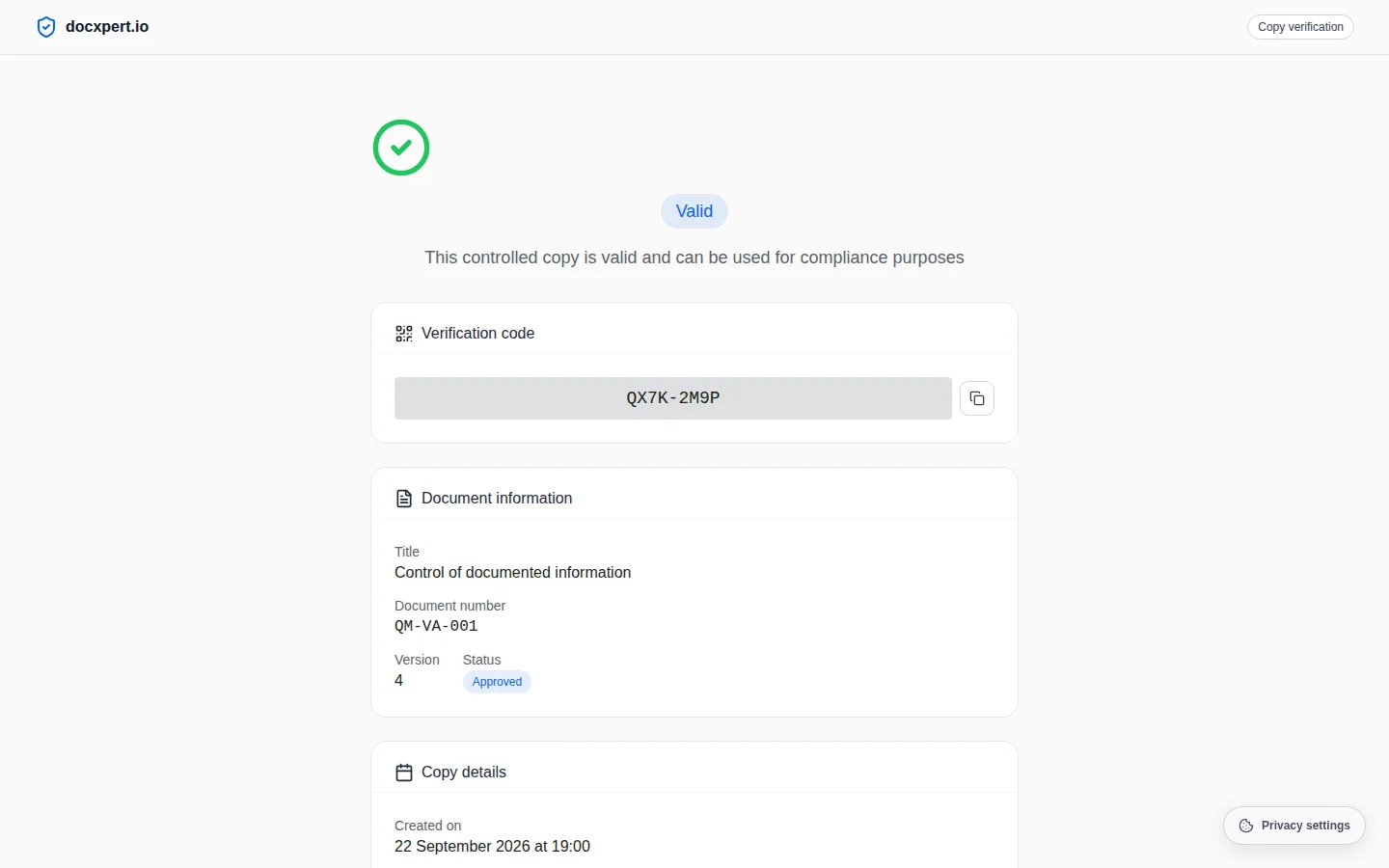
The problem with printouts
Even in the digital age, printed work instructions, inspection plans and safety notices hang in workshops, labs and warehouses. As soon as a new version is approved, these printouts become a risk: nobody can tell whether they are still valid. Outdated printouts are among the most frequent audit findings of all.
ISO 9001 clause 7.5.3 requires current documents to be available and unintended use of obsolete documents to be prevented. ISO 13485 requires this explicitly in 4.2.4. The classic approach – numbered copies, distribution lists and collecting old copies – is laborious and error-prone. Controlled copies with a QR code let anyone check validity in seconds.
How controlled copies work
- 1
Create a copy
From an approved document you create a controlled copy. It contains a unique verification code and a QR code that points to the public verification page.
- 2
Limit validity
Optionally, the copy gets an expiry date. After that, the check reports “expired”, even if the document is still valid.
- 3
Check on site
Anyone scans the QR code with a smartphone – no login needed. The page shows document, number, version, status and the copy's creation date.
- 4
Invalid automatically
When a new version becomes effective or the document is withdrawn, the check immediately shows the copy as invalid.
Besides controlled copies there are uncontrolled copies, for example for customers or training purposes. They are marked as such and are not tracked. For each document you define which kinds of copies are allowed.
Withdrawing documents with evidence
Sometimes a document has to be taken out of use immediately – because of an error, a compliance issue or because the process no longer exists. Withdrawal in docxpert records the reason (obsolete, error, compliance, other), sets the document to withdrawn and informs the people affected.
- Acknowledgement: the people affected confirm in their personal inbox that they have noted the withdrawal.
- Copies: all controlled copies become invalid; the QR code check shows the withdrawal.
- Evidence: time, reason, responsible person and acknowledgements are logged in the audit trail.
- No data loss: withdrawn documents are kept as evidence and cannot be hard-deleted.
Features at a glance
Standards reference
| Standard | Requirement | Implementation |
|---|---|---|
| ISO 9001:2015, 7.5.3.1 | Documented information is available and suitable where and when needed | Printouts with an instant validity check |
| ISO 9001:2015, 7.5.3.2 | Prevent unintended use of obsolete documents | Automatically invalid on new version or withdrawal |
| ISO 13485:2016, 4.2.4 | Identify obsolete documents and prevent their unintended use | Status on the verification page, withdrawal with acknowledgement |
| IATF 16949:2016, 7.5.3.2.2 | Implement engineering specifications and changes in time | Fast distribution of new versions, old copies invalid |
Introducing controlled copies: making the switch
Switching from numbered paper copies to verifiable copies takes only a few days. First, record which documents are printed at all – usually work instructions, inspection plans, operating instructions and emergency plans. Define that only controlled copies are allowed for these documents and replace existing postings once with new copies carrying a QR code.
After that, you no longer need distribution lists: the overview in docxpert shows which copies exist at any time. When a new version arrives, the people on site simply print again – the old copies are recognisably invalid anyway. For documents needed only for a short time, such as project materials, set an expiry date.
Example: inspection plan on the line
Every production line displays the inspection plan as a controlled copy with a QR code. After a customer complaint, the inspection plan is changed and approved. From that moment, checking the old copies shows “invalid”. The shift lead prints new copies, and operators confirm the new version via read and understood.
In the next audit, the auditor scans three postings at random – all valid. The overview in docxpert also shows when each copy was created and checked.
Frequently asked questions
How many controlled copies can I create?
As many as you need. For each document you define whether controlled and uncontrolled copies are allowed; each copy is tracked individually.
Does verification work without internet at the workstation?
Verification needs an internet connection; a smartphone is usually enough. Without a connection, the printed verification code can be checked later.
What is a controlled copy?
A controlled copy is a printout or file of a document whose validity is monitored. When the document changes or is withdrawn, the copy is recognised as invalid too.
Do people checking a copy need an account?
No. The verification page is public and shows only what is needed: document, number, version, status and the copy's dates.
What is the difference to an uncontrolled copy?
Uncontrolled copies are not tracked and are marked as such, for example for quotes or information. Controlled copies can be verified and lose their validity automatically.
Can withdrawn documents be deleted?
No. Withdrawn and approved documents are kept as evidence, so you can prove which rule applied in the past.
Are people informed about a withdrawal?
Yes. The people affected get an acknowledgement in their personal inbox and confirm it there; confirmations are logged.