_1762866128417-DS2_OO1j.png)
Why “distributed” does not mean “known”
A new version of a work instruction is approved – but do the people who should follow it know about it? A broadcast email proves nothing, and a posted sheet is easily overlooked. In the audit, the auditor asks an employee about the changed rule, and the answer describes the old version.
ISO 9001 clause 7.3 requires people to be aware of relevant requirements and their contribution, and 7.5.3 requires documented information to be distributed and available. A read confirmation makes acknowledgement provable per person – with a date and a reference to the exact version.
How read and understood works
- 1
Choose recipients
On or after approval, choose individual people, whole departments or both. Department members are included automatically.
- 2
Set a deadline
By when should people read and confirm? The deadline appears in the recipients' personal inbox.
- 3
Read and confirm
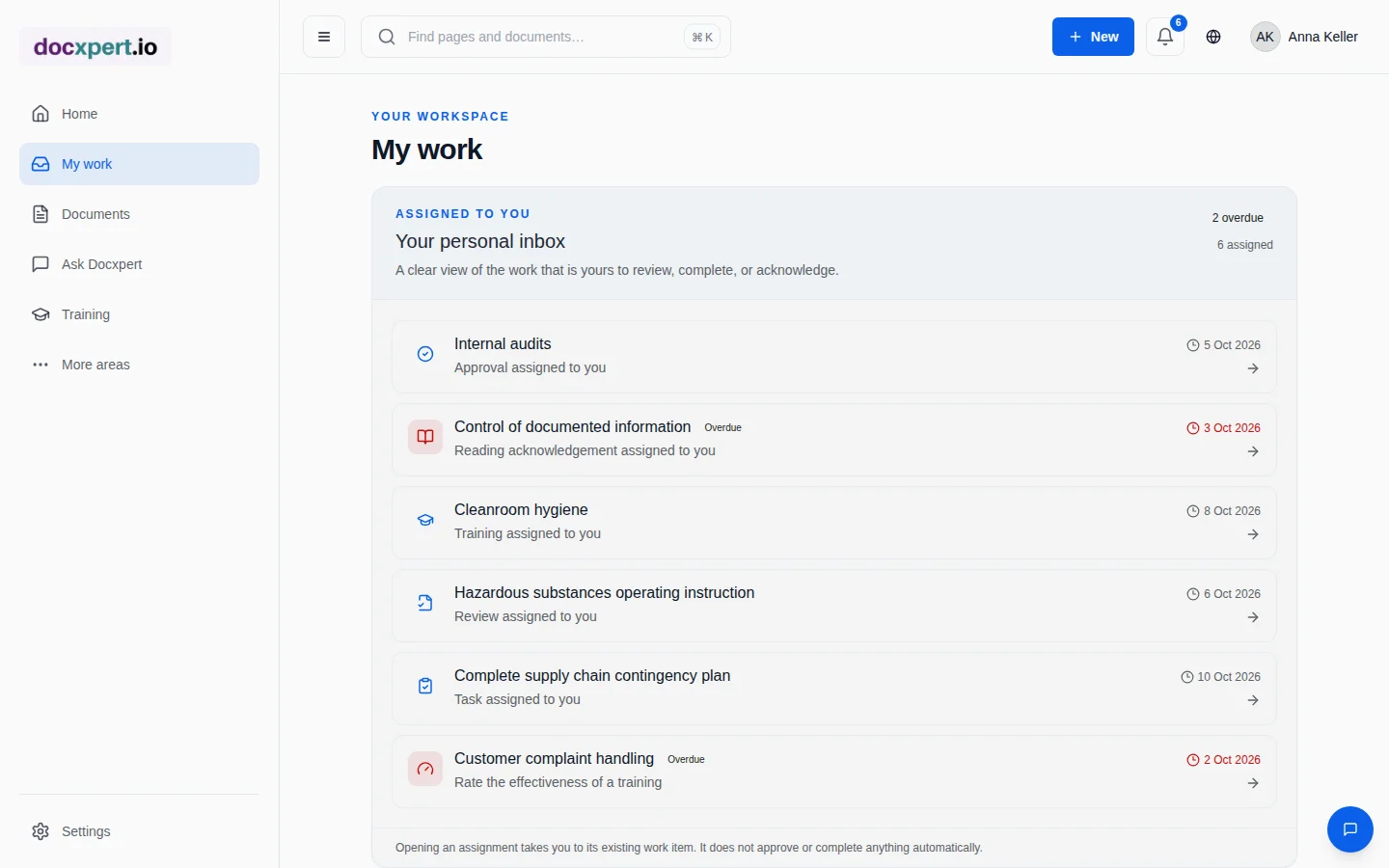
Recipients open the document in the assigned version and explicitly confirm that they have read it.
- 4
Track status
Per document you see who has confirmed, who is still open and who is overdue.
Features at a glance
Read confirmation or training?
Not every change needs training. Rule of thumb: the higher the risk of an error, the more evidence you need.
| Situation | Recommendation | Rationale |
|---|---|---|
| Editorial change, new form version | No confirmation or a read confirmation | Low risk, information is enough |
| Changed responsibilities or deadlines | Read confirmation with deadline | Awareness must be provable |
| New inspection step, changed safety rule | Online training with knowledge check | Understanding must be provable |
| New task, practical skill | Classroom training or on-the-job instruction | Practice cannot be learned by reading alone |
More in our guide to training effectiveness.
Standards reference
| Standard | Requirement | Contribution of read confirmation |
|---|---|---|
| ISO 9001:2015, 7.3 | Awareness of policy, objectives and implications of nonconformity | Evidence that people affected know the relevant rules |
| ISO 9001:2015, 7.5.3 | Distribution, access and availability of documented information | Targeted distribution with deadline |
| ISO 13485:2016, 6.2 | Awareness of the relevance and importance of activities | Version-specific confirmation per person |
| ISO/IEC 27001:2022, 7.3 and A.5.1 | Awareness; policies communicated and acknowledged | Read confirmation for security policies |
| ISO 45001:2018, 7.3 | Awareness of hazards and controls | Confirmation of changed operating instructions |
Using read confirmations well
Read confirmations only work if they do not become a meaningless routine. Distributing every minor change to everyone creates click fatigue – and in the end everyone confirms without reading. Three rules have proven themselves:
- Distribute selectively: only the people and departments whose work changes receive a confirmation.
- Explain the change: a short change reason and the version comparison show what matters.
- Realistic deadlines: one to two weeks for normal changes, shorter for safety-related rules.
That way the read confirmation stays a signal people take seriously: when it arrives, something important has happened.
Example: a new IT security policy
A service provider certified to ISO 27001 revises its mobile device policy. After approval, the information security officer assigns a read confirmation to all departments with a two-week deadline. After one week, the overview shows 85% confirmations; the remaining people still see the task in their inbox.
In the surveillance audit, the auditor asks how policies are communicated. The answer is one click: list of recipients, confirmations with dates, reference to version 3 of the policy.
Frequently asked questions
Can deskless employees confirm?
Yes. docxpert runs in the browser on smartphones and tablets; employees read and confirm directly in their personal inbox.
What is a read and understood confirmation?
It is documented evidence that a person has read a specific document in a specific version – with a date.
What happens if a new version appears during the deadline?
The open confirmation for the old version is marked as superseded. You assign the new version again if needed.
Can whole departments be assigned?
Yes. You choose departments and/or individual people; all active members are included.
Do recipients see their open confirmations?
Yes, in the personal inbox with the deadline and an overdue flag.
Is a read confirmation a training record?
It proves acknowledgement, not understanding. For critical content, combine it with online training and a knowledge check.
Can I show read confirmations in an audit?
Yes. Per document you see recipients, status and confirmation date; all events are also in the audit trail.
How should I handle outstanding acknowledgements after a deadline?
An open acknowledgement is a status, not proof that someone does or does not know the instruction. Check that the assignment targets the right person, role and document version, and whether absence, shift patterns or lack of system access explain the missing response. Remind the employee through the agreed channel and escalate critical content to the responsible manager. If the person no longer performs the task, correct the assignment with a traceable reason rather than entering a confirmation on their behalf. When a new document version is issued, keep acknowledgement of the changed version separately traceable. Define internally when acknowledgement is enough and when training or a competence check is needed; that decision should reflect the task and its risk.