_1762866128417-DS2_OO1j.png)
Why approvals by email and signature are no longer enough
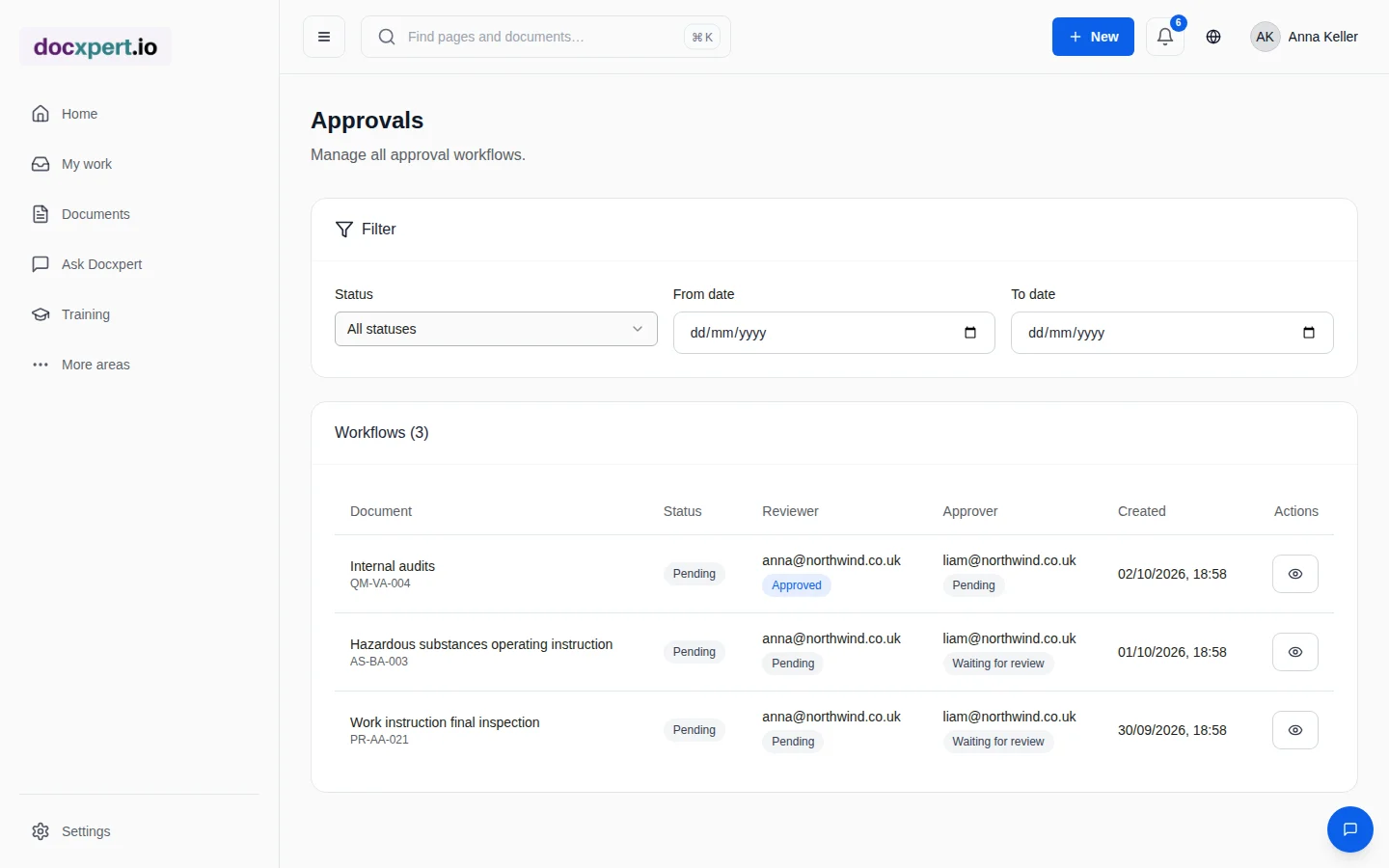
In many companies, document approval runs through email chains, routing folders or scanned signature pages. That costs time and creates gaps: approvals sit idle because nobody is reminded of the deadline. The wrong person approves because the rule only exists in the quality manager's head. And in the audit, there is no evidence of who reviewed which version when.
ISO 9001 clause 7.5.2 requires documented information to be reviewed and approved for suitability and adequacy before use. ISO 13485 additionally requires changes to be approved by the original approving function or another designated function. A digital approval workflow makes these rules binding and provable.
How an approval works in docxpert
- 1
Submit for review
The author submits the draft. docxpert determines from the document type's approval rule whether a single or dual-stage approval is needed and who is eligible.
- 2
Technical review
In dual-stage approvals, a subject matter expert reviews first. They can comment, reject or confirm.
- 3
Approval
The approver confirms by re-authenticating. This clearly documents that the authorised person acted personally.
- 4
Effective and distributed
On approval, the version becomes effective and the previous version is archived. Read confirmations and retraining can start automatically.
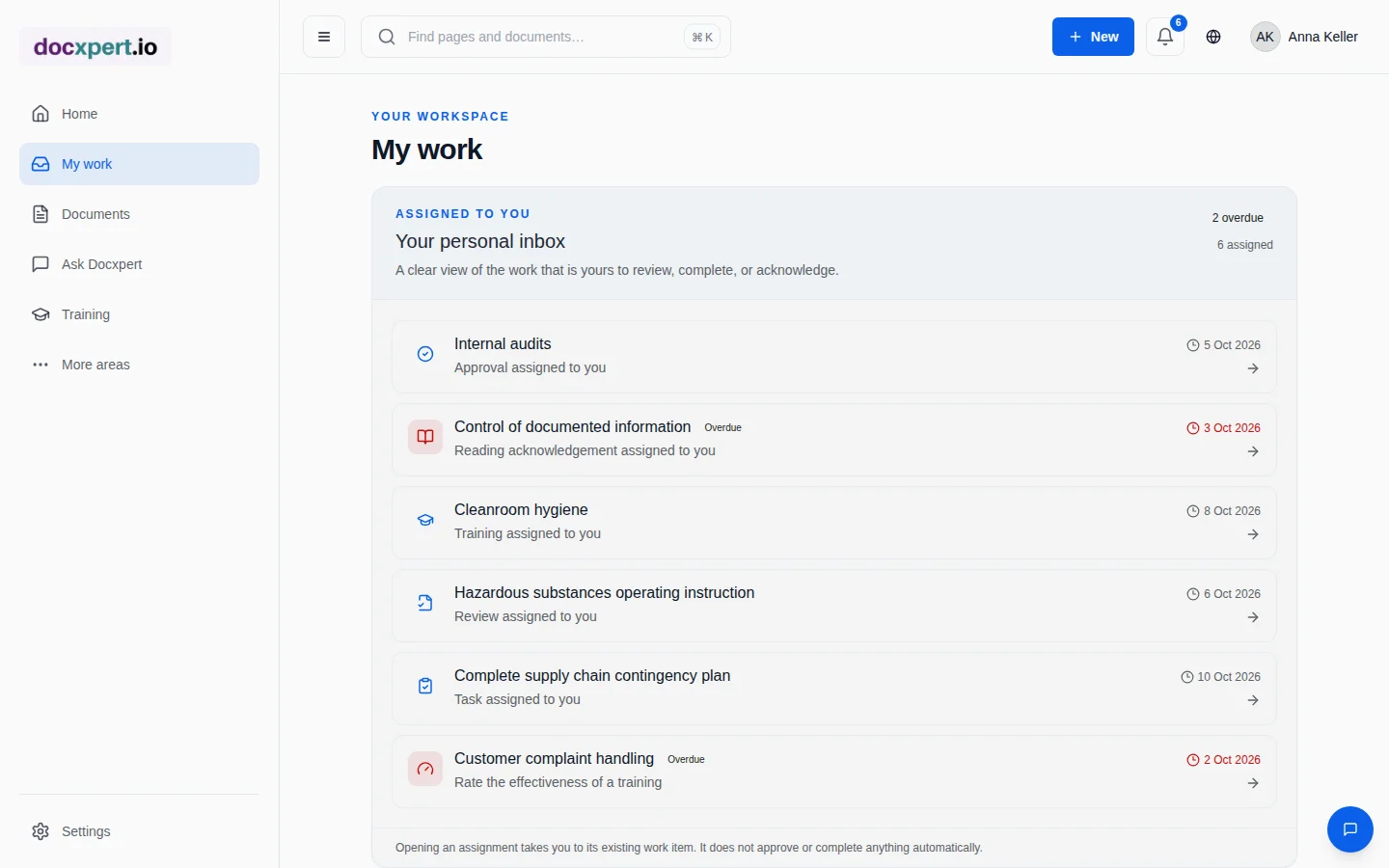
All open reviews and approvals appear in the participants' personal inbox – with due dates and a flag when something is overdue. Approvers also receive an email notification.
Features for reliable approvals
Standards reference
| Standard | Requirement | In docxpert |
|---|---|---|
| ISO 9001:2015, 7.5.2 c | Review and approval for suitability and adequacy | Review and approval step with log |
| ISO 13485:2016, 4.2.4 | Review and approval before issue; changes by the original or a designated function | Approval rules per document type with named roles |
| ISO/IEC 27001:2022, 5.2 and 7.5 | Policies established by top management; documented information controlled | Management approval as its own rule |
| 21 CFR Part 11 (orientation) | Electronic signatures uniquely linked with their meaning | Re-authentication, linking person, time and decision |
Good approval rules in practice
Approval rules should be as simple as possible and as strict as necessary. A distinction by document risk works well:
| Document type | Recommended approval | Rationale |
|---|---|---|
| Quality policy, policies | Approval by top management | Strategic decisions of top management |
| Procedure | Review by process owner, approval by quality | Affects several departments |
| Work instruction | Approval by the area manager | Local process, quick changes needed |
| Form | Approval by quality | Structure of records |
Also set deadlines – for example five working days for review and approval – and agree who deputises during absences. That turns approval from a bottleneck into a routine.
Approval, distribution and training in one flow
An approval only becomes effective once the people affected know the new requirement and apply it. That is why the flow in docxpert does not end with the signature: when approving, you define who must read and confirm the new version. If the document is the basis of a training, retraining on the new version is prepared automatically – you only review and publish it.
The result is an unbroken chain from the reason for the change through review and approval to evidence that employees have been informed and trained – exactly the chain auditors ask about when things change. More under read and understood and training management.
What changes for your team
- Shorter lead times, because everyone sees what is waiting for them and what is overdue.
- No wrong approvals, because the rules live in the system, not in people's memory.
- Audit evidence in one click, because every decision is logged with person, time and version.
- Fewer questions, because comments sit on the document and the version comparison shows what changed.
Frequently asked questions
How long does it take to set up approval rules?
For most companies less than an hour. docxpert comes with standard rules for single and dual-stage approvals that you adopt or adapt per document type.
Can one person both review and approve?
In single-stage approvals one person approves. In dual-stage approvals docxpert requires separate, independent people for review and approval.
What happens if an approval is rejected?
The document goes back to the author with the comment. After revision it is resubmitted; the rejection remains in the log.
Are participants reminded of approvals?
Yes. Open approvals sit in the personal inbox with a due date, approvers are also notified by email, and overdue approvals are flagged.
Is re-authentication an electronic signature?
It fulfils the central function: the approver confirms their identity immediately before the decision, and person, time and meaning of the decision are stored.
Can I export approvals afterwards?
Yes. The audit trail can be filtered and exported as CSV or PDF, for example for an audit or a customer request.