_1762866128417-DS2_OO1j.png)
What is a training matrix?
A training matrix – also called a skills matrix, competency matrix or qualification matrix – is a table that maps people or roles against the required qualifications. Each cell shows whether the qualification is complete, in progress, due or expired. That makes it visible whether enough qualified people are available for each task.
| Term | Focus |
|---|---|
| Training matrix | Which trainings have been completed, which are due? |
| Qualification matrix | Which qualifications and authorisations does each person hold? |
| Competency or skills matrix | How well does a person master a task – with competence levels? |
In practice the terms overlap. What matters is that the matrix answers the questions important to your organisation: who may operate this machine? Who may approve test reports? Who still needs to read the new work instruction?
What the standards require on competence
Almost all management system standards require you to determine, ensure and demonstrate the necessary competence. A training matrix is the most common tool for this, even though no standard explicitly mandates it.
| Standard | Clause | Specifics |
|---|---|---|
| ISO 9001 | 7.2 | Determine and ensure competence, evaluate effectiveness of actions, retain evidence |
| ISO 13485 | 6.2 | Documented procedure, demonstrate training effectiveness |
| IATF 16949 | 7.2.1–7.2.4 | On-the-job training, competence of internal auditors |
| ISO 45001 | 7.2 | Competence regarding hazards and risks of the work |
| ISO 27001 | 7.2, A.6.3 | Competence and awareness for information security |
| ISO/IEC 17025 | 6.2 | Authorisation for specific laboratory activities, monitoring of competence |
How a training matrix is structured
A matrix has two axes. Rows list people – grouped by department, team or role. Columns list qualifications – such as trainings, safety briefings, certificates, equipment authorisations or documents read. A consistent legend makes the status quick to read:
| Status | Meaning | Typical colour |
|---|---|---|
| Complete | Qualification is held and valid | Green |
| Due soon | Validity expires in the coming weeks | Yellow |
| Open | Assigned but not yet completed | Grey or blue |
| Overdue or expired | Deadline missed or validity expired | Red |
| Not required | Not intended for this person or role | Empty |
Defining competence levels
For tasks where experience matters, "trained yes/no" is often not enough. Competence levels defined consistently help:
| Level | Description |
|---|---|
| 0 | No knowledge |
| 1 | Basic knowledge, works under supervision |
| 2 | Works independently on standard tasks |
| 3 | Also handles special cases, can fix problems |
| 4 | Expert, can train and authorise others |
Define the required level for each role. The difference between target and actual shows the training need.
Building a training matrix in seven steps
- 1
Capture tasks and roles
Which tasks affect quality, safety, environment or information security? Group people with the same tasks into roles.
- 2
Define requirements per role
Determine education, trainings, briefings, authorisations and required competence levels for each role.
- 3
Record the current state
Collect existing evidence: certificates, attendance lists, briefing records, onboarding plans.
- 4
Define validity
Decide which qualifications expire and how often they are refreshed.
- 5
Close gaps
Plan trainings, onboarding or briefings for missing qualifications with dates and owners.
- 6
Evaluate effectiveness
Check whether the actions worked – see the guide training effectiveness evaluation.
- 7
Update regularly
New hires, role changes, new documents and expiring evidence keep the matrix moving. Decide who maintains it.
Role-based rather than person-based
The most common mistake is defining requirements for each person individually. That works for ten employees, not for a hundred. It is better to link requirements to roles, departments or sites. When someone changes role or joins the company, the requirements follow automatically.
- Role "CNC machine operator": safety briefing, equipment authorisation, set-up work instruction, first-article inspection instruction.
- Role "Internal auditor": auditor training, knowledge of the standards, participation in at least one audit per year.
- All employees: data protection, information security, fire safety, quality policy.
Validity and refreshers
Many qualifications are not valid forever. Typical intervals – depending on legal requirements and your own assessment – are:
| Qualification | Typical interval |
|---|---|
| General safety briefing | Annually |
| Data protection and information security | Annually |
| First aiders | Every two years |
| Forklift, crane | Annual briefing, certification as required |
| Work instruction read | With every new version |
A matrix that knows expiry dates warns in time and prevents anyone working with an expired qualification.
Example: extract from a training matrix
| Person (role) | Safety briefing | WI set-up v4 | First-article inspection | Data protection |
|---|---|---|---|---|
| A. Kaya (CNC operator) | Complete until 03/2027 | Read | Level 3 | Complete |
| M. Weber (CNC operator) | Due soon 11/2026 | Open | Level 2 | Complete |
| J. Novak (quality inspection) | Complete | Not required | Level 4 | Overdue |
| L. Smith (new, onboarding) | Complete | Open | Level 1 | Open |
Even this small extract shows three actions: a briefing due soon, a new work instruction not yet read and an overdue data protection training. It also shows that only one person at level 4 is available for first-article inspection – a bottleneck during holidays or sickness.
More than audit evidence
A well-maintained training matrix helps far beyond the audit:
- Staffing and cover planning: shift leads see who may take over a task.
- Spotting bottlenecks: qualifications held by only one person are a risk to delivery and knowledge retention.
- Staff development: the gap between target and actual level is a good basis for development conversations.
- Onboarding: new employees see from day one what they need to learn and by when.
- Management review: training completion and overdue qualifications are meaningful KPIs for clause 9.3.
Spreadsheet or software?
| Criterion | Spreadsheet | Training software |
|---|---|---|
| Getting started | Fast, no cost | Setup required |
| Currency | Maintained manually, easily outdated | Status from trainings and read acknowledgements |
| Expiry dates | Conditional formatting, no reminders | Automatic reminders and escalation |
| New hires | Add a row manually | Requirements follow from the role |
| Audit evidence | Spreadsheet plus binder of records | Matrix with linked certificates |
Up to about 20 employees and a few qualifications, a spreadsheet is often enough. Beyond that, the maintenance effort grows quickly – and with it the risk of outdated data.
Common mistakes
- The matrix shows attendance but no requirements – gaps stay invisible.
- Validity dates are missing, so expired briefings only surface in the audit.
- New document versions don't trigger retraining.
- The matrix is only updated before the audit.
- Effectiveness is not evaluated, although ISO 9001 requires it.
Use the training records checklist to check your matrix and evidence in 30 points.
The training matrix in docxpert
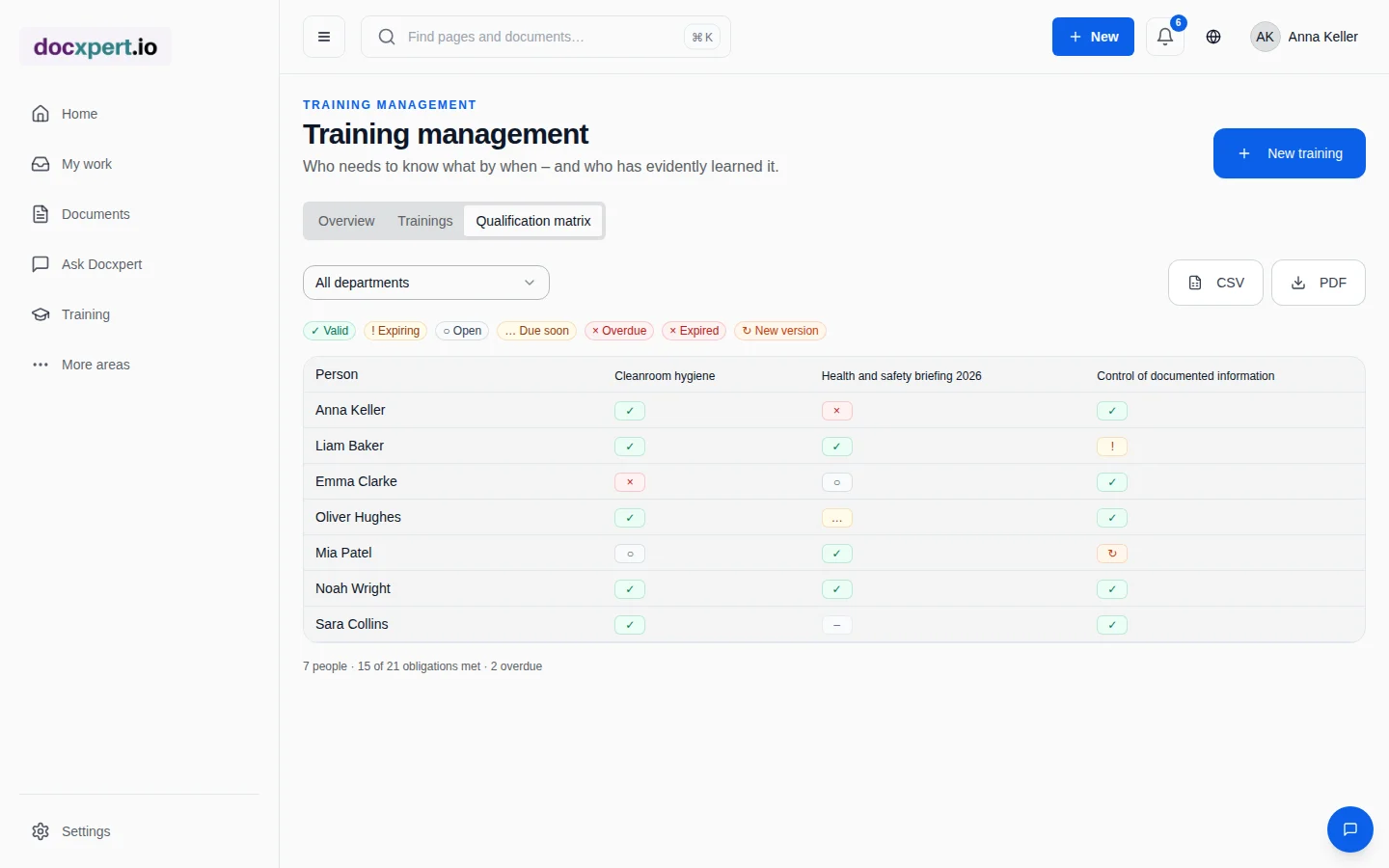
In docxpert the matrix is built automatically from trainings: audiences can be set flexibly by person, role and department, and status and validity are taken from trainings, classroom sessions and external evidence. Reminders and escalations run automatically, and the matrix can be exported as CSV or PDF.
Frequently asked questions
How detailed should a training matrix be?
Detailed enough to answer "may this person perform this task?". For high-risk tasks a fine breakdown with competence levels pays off; for general topics a simple status is often enough. Too many columns make the matrix hard to read.
What should I show in the management review?
A few KPIs have proven useful: share of mandatory qualifications met, number of overdue trainings, bottlenecks in critical qualifications and results of effectiveness evaluations. Derive actions and training budgets from them.
Is a training matrix mandatory under ISO 9001?
No, the standard does not prescribe a specific tool. But it requires competence to be determined, ensured and demonstrated. A matrix is the usual way to do that and what auditors expect.
How often should the matrix be updated?
Continuously – with every new hire, role change, new document and completed training. It should also be reviewed for completeness at least annually, for example as part of the management review.
Who is responsible for the training matrix?
Usually HR or the quality team maintains it; managers define the requirements per role. A clear owner is what matters.
Should documents read be included in the matrix?
Yes, if reading a requirement is a prerequisite for the task. Read acknowledgements for work instructions are a common component.
How do I show external certificates?
External evidence such as welding certificates or forklift licences is recorded with issue date and validity and shown in the matrix like internal trainings.
Can I start with a spreadsheet template?
Yes. A table with people, qualifications and status is enough to start. As the number of employees or qualifications grows, software with automatic reminders pays off.
How should I handle expiring qualifications and short-notice role changes?
Set a clear validity rule and evidence source for each qualification, such as a certificate or practical assessment. An approaching expiry should trigger a task, but it is not by itself proof that a person remains competent. Before renewal, check whether the person performs the work regularly, whether procedures or equipment have changed and whether refresher training is needed. When someone changes roles, managers and HR or quality owners should compare the new duties with required competence levels. Record interim measures if a person does not yet meet every requirement, and limit tasks accordingly. A reliable matrix ties updates to hire, departure, transfer and completed assessment events while keeping unresolved gaps visible.