_1762866128417-DS2_OO1j.png)
The NIS2 reporting cascade
Article 23 of the NIS2 Directive requires essential and important entities to report significant incidents to the competent authority or CSIRT in fixed stages. The deadlines start as soon as the entity becomes aware of the incident – weekends included.
| Stage | Deadline | Content |
|---|---|---|
| Early warning | 24 hours after becoming aware | Suspected unlawful or malicious act? Possible cross-border impact? |
| Incident notification | 72 hours after becoming aware | Initial assessment: severity, impact, indicators of compromise |
| Intermediate report | At the authority's request | Relevant status updates |
| Final report | One month after the incident notification | Detailed description, root cause, mitigation measures applied, cross-border impact |
Background, criteria for significant incidents and wording tips are in our guide to NIS2 incident reporting.
How docxpert supports reporting
- 1
Record the incident
Title, description, affected systems, owner and – crucially – the time of detection. You choose whether the incident falls under NIS2 or the Cyber Resilience Act.
- 2
Deadlines are calculated
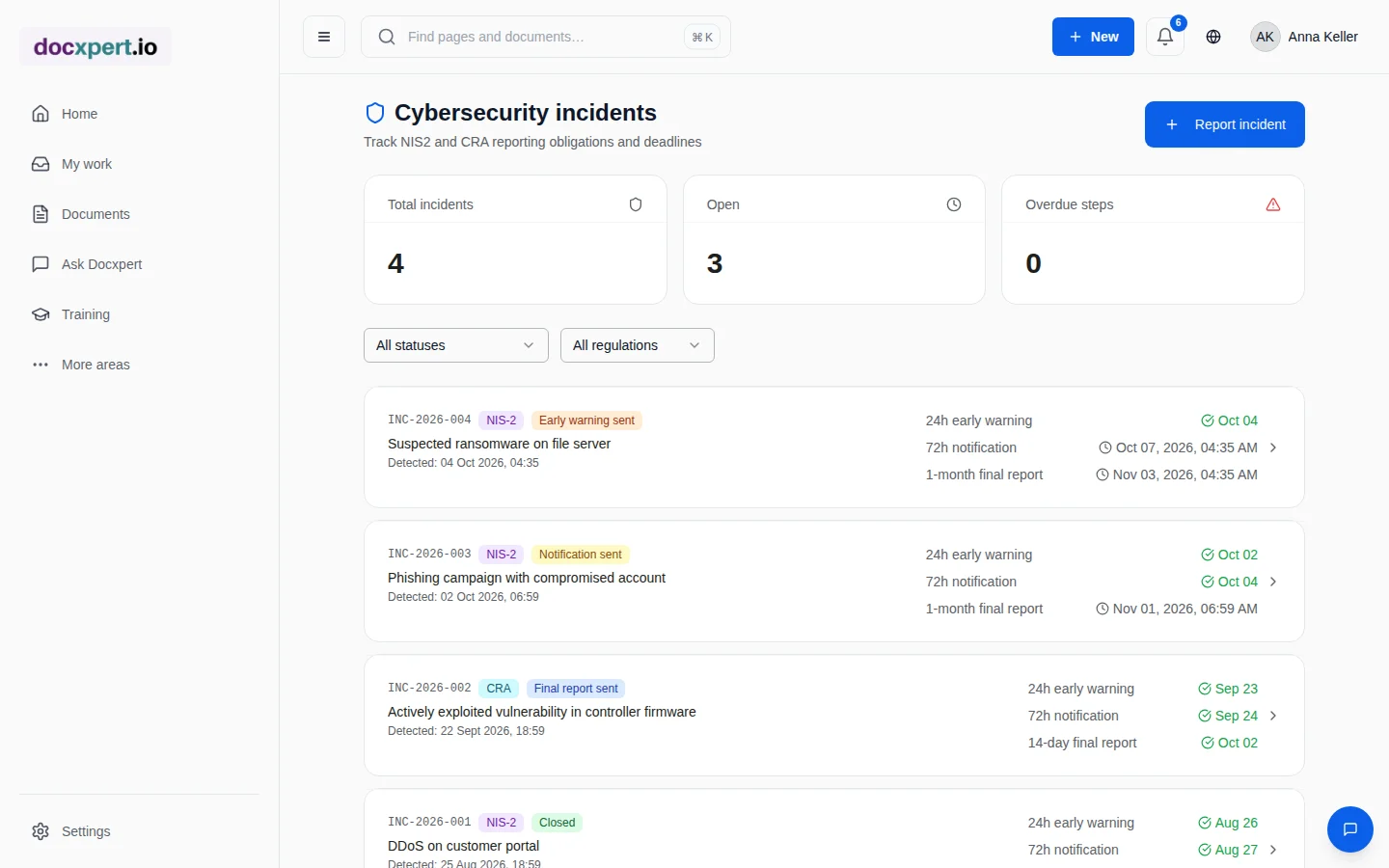
From the detection time, docxpert calculates the deadlines for early warning, incident notification and final report automatically.
- 3
Report step by step
After each notification you move the status forward and record content and time of the notification. Completed steps turn green; open ones show the time remaining.
- 4
Spot overdue items
The overview counts open incidents and overdue reporting steps – so nothing gets lost between shift changes and weekends.
- 5
Close and learn
After the final report, the incident is closed. Lessons learned flow into your management system as a corrective action.
Features at a glance
When is an incident significant?
Not every security incident must be reported. Under Article 23(3), an incident is significant if it
- has caused or is capable of causing severe operational disruption of the services or financial loss for the entity, or
- has affected or is capable of affecting other natural or legal persons by causing considerable material or non-material damage.
Implementing acts and national rules specify these criteria for certain sectors. Define internally who assesses significance – and when in doubt, record every incident in docxpert so that the deadlines run from detection while the assessment takes place.
What good incident documentation contains
Authorities expect traceable, fact-based notifications – even when much is still unclear in the first hours. For each incident, record at least the following in docxpert:
- Detection time and how the incident was discovered
- Affected systems, services and sites
- Initial assessment of cause, severity and possible cross-border impact
- Immediate actions taken and when
- Content, recipient and time of every notification
- Root cause, mitigation measures and lessons learned in the final report
Whatever is not yet known at the time of the early warning is added in the incident notification and the final report. What matters is that every stage shows what you knew and did at that point in time.
Be prepared before it happens
The 24-hour deadline can only be met if the process has been practised. docxpert helps with preparation too:
- Reporting process as a procedure: templates for incident management and the NIS2 reporting process in the template library.
- Training for those involved: whoever reports in an emergency is trained with evidence – see training management.
- Management training: Art. 20 requires regular training for management bodies; assign it to the executive team with a deadline.
- Document exercises: exercise incidents can be recorded and reviewed.
The NIS2 checklist gives an overview of all obligations.
Example: suspected ransomware on a Friday evening
Friday, 8:38 pm: monitoring reports unusual encryption activity on a file server. The head of IT records the incident in docxpert with detection time 8:38 pm. The early warning is therefore due by Saturday 8:38 pm, the incident notification by Monday 8:38 pm.
On Saturday morning, the early warning goes to the competent CSIRT; the step is documented with time and content. On Monday, the incident notification with an initial assessment follows, and four weeks later the final report. The subsequent CAPA leads to improved network segmentation. When the supervisory authority reviews the case, all notifications with timestamps are available.
Frequently asked questions
When do NIS2 reporting deadlines start?
From the moment the entity becomes aware of the significant incident. That is why the detection time is a mandatory field in docxpert.
Does docxpert report directly to the authority?
No. Notifications are submitted via the portal or channel of the competent authority or CSIRT. docxpert organises deadlines, ownership and evidence.
Does docxpert support the Cyber Resilience Act?
Yes. Incidents can be recorded as NIS2 or CRA cases; deadlines are calculated accordingly.
What if an incident is later classified as not significant?
Document the assessment and close the incident. The record shows that you assessed the incident.
Who should be allowed to record incidents?
Everyone who acts in an emergency: IT operations, information security, management. The owner handles the incident.
Do I still need a ticketing system?
Many teams keep their ticketing system for technical handling. docxpert adds the regulatory view: deadlines, notifications and evidence.